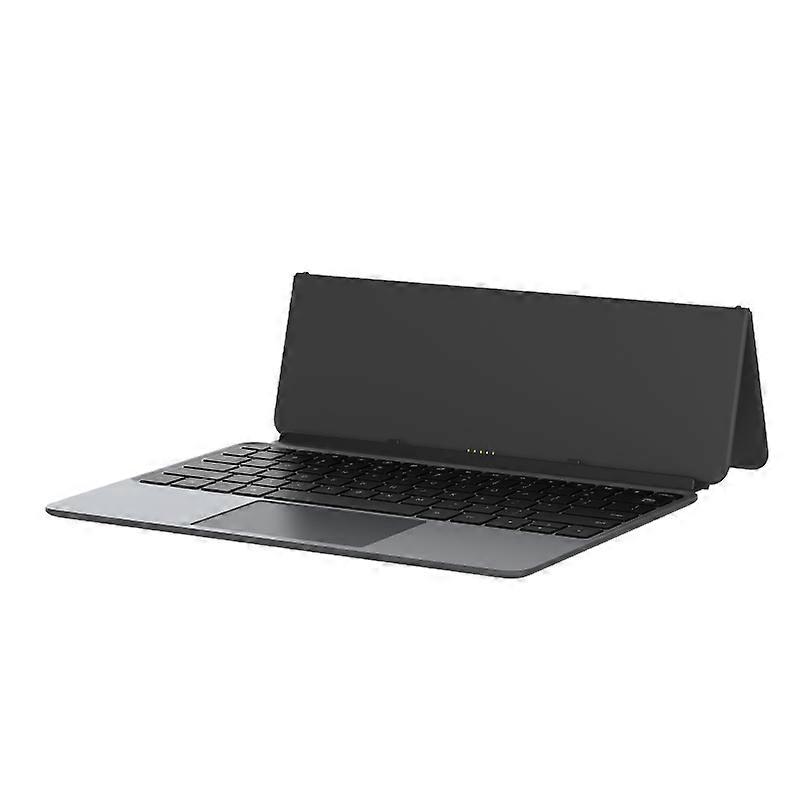
Alldocube Keyboard For Ultra Pad

574,00 RON
+ 25,00 RON Livrare

Alldocube Keyboard For Ultra Pad

  • Marcă: Unbranded
Vândut de:

Alldocube Keyboard For Ultra Pad

  • Marcă: Unbranded

574,00 RON

Economii 125,00 RON (17%)

Preț recomandat

699,00 RON
În stoc
+ 25,00 RON Livrare

Politica de retur pe 14 zile

Vândut de:

574,00 RON

Economii 125,00 RON (17%)

Preț recomandat

699,00 RON
În stoc
+ 25,00 RON Livrare

Politica de retur pe 14 zile

Metode de plată:

Descriere

Alldocube Keyboard For Ultra Pad

Alldocube Keyboard For Ultra Pad Important Note: If you have any questions, or if there are any problems with the package you received, please contact us through Aliexpress chatting as soon as possible. We have professional customer service staff and technical support, and we will try our best to assist you in solving the problem. Your understanding would be highly appreciated. Note: 1.Only the keyboard is included, not the tablet. 2.This keyboard is only compatible with Ultra Pad. Please purchase it according to your own needs. Keyboard instructions 1. Keyboard OTA upgrade The U1380 official keyboard is ALLDOCUBE/x27;s first keyboard that can be upgraded online via OTA. When the keyboard is pushed for an upgrade, it will automatically pop up a window to prompt that the keyboard is in the process of upgrading after being connected to the tablet. The upgrade takes approximately 1 to 2 minutes to complete. If there is an unsuccessful upgrade, the next time the keyboard is connected, it will remind you to upgrade again. After connecting the keyboard to the tablet, you can check the keyboard version in Settings - System Settings - Keyboard - Keyboard Firmware Version. This function will only be displayed after the keyboard is connected. It is not displayed normally. The current firmware version is 1.05 2. Keyboard language and layout switching Due to the different keyboard language usage habits in each country, it is necessary to make Settings before officially using the keyboard. The Settings are very simple and only require a few steps. 1. Open the tablet Settings APP and find the System Settings option. 2. System Settings > Language > Put the language you want to use first. Iii. System Settings > Keyboard > Physical Keyboard > uart_dock > Multilingual Settings > Select Your language. 4. System Settings > Keyboard > On-Screen Keyboard > Gboard > Language > Select Your Language > Select the keyboard style you want (it is very important to be consistent with the style of your keyboard film) - Go back. 5. Open a dialog box that allows input > Long press the space bar > On the page that pops up, select your language to complete the Settings. 3. Disable/Enable the touchpad function The ⌘/P key combination turns the touchpad function off/on. Pressing this key combination will prompt the tablet 4. The keyboard functions are mainly available in tablet mode. Some key combinations are not available in computer mode.
  • Marcă: Unbranded
  • Categorie: Tastaturi
  • Stil: Keyboard
  • ID Fruugo: 458026653-965124651
  • EAN: 6942755935319

Livrări şi Returnări

Expediat în 3 zile

  • STANDARD: 25,00 RON - Livrare între lun. 02 februarie 2026–vin. 06 februarie 2026

Livrare de la China.

Facem tot ce ne stă în putinţă să ne asigurăm că produsele comandate de dumneavoastră vă sunt livrate în întregime şi conform specificaţiilor. Cu toate acestea, dacă primiţi o comandă incompletă sau articole diferite de cele comandate, sau aveţi alt motiv pentru care nu sunteţi mulţumit de comandă, puteţi returna comanda sau orice produse incluse în comandă şi primiţi o rambursare completă pentru articole. Vizualizaţi întreaga politică de returnare

Detalii de conformitate a produsului

Vă rugăm să consultați informațiile de conformitate specifice acestui produs prezentate mai jos.

Următoarele informații sunt furnizate de comerciantul independent terț care vinde acest produs.

Producător:
În continuare se prezintă informațiile de contact ale producătorului produsului relevant vândut pe Fruugo.

  • Hangzhou Zichi Network Technology Co., Ltd
  • Hangzhou Zichi Network Technology Co., Ltd
  • Room 205, Building 3, No. 1866, Binxing Road
  • Changhe Street, Binjiang District
  • Hangzhou
  • China
  • 310000
  • 18758862577@163.com
  • 15158876167

Persoana responsabilă în UE:
În continuare se prezintă informațiile de contact ale persoanei responsabile din UE. Persoana responsabilă este operatorul economic desemnat, cu sediul în UE, care este responsabil pentru obligațiile de conformitate referitoare la produsul relevant vândut în Uniunea Europeană.

  • Universal International business SARL
  • Universal International business SARL
  • 254 Rue Vendome 69003 Lyon
  • Lyon
  • France
  • 69003
  • Leroy.Holliana@outlook.com
  • 33773332462