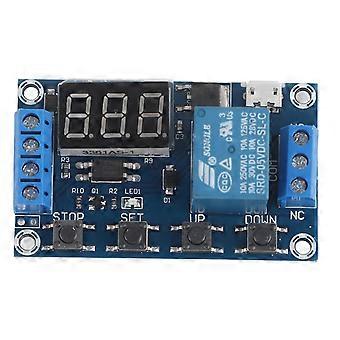
DC 6V~30V Trigger Delay Time Relay Module with Digital LED Display, Micro USB 5V

108,32 RON
Livrare GRATUITĂ

DC 6V~30V Trigger Delay Time Relay Module with Digital LED Display, Micro USB 5V

Vândut de:

108,32 RON

Economii 15,00 RON (20%)

Preț recomandat

123,32 RON
În stoc
Livrare GRATUITĂ

Politica de retur pe 14 zile

Metode de plată:

  • Marcă: Unbranded

Descriere

DC 6V~30V Trigger Delay Time Relay Module with Digital LED Display, Micro USB 5V
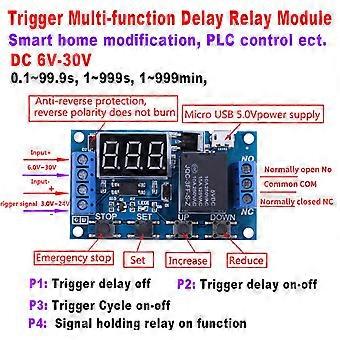
Features:Wide DC power supply voltage from 6V to 30V, support micro USB 5.0V power supply, very convenient to use.Interface is clear, simple and powerful, easy to understand, almost meet all your needs.The module supports reverse input protection, and there is a STOP button for emergency stop function. Added sleep mode, it will automatically turn off display if no operation in 5 minutes after enabled, and you can press any button to wake it up.You can set different OP, CL, LOP parameters, these parameters were independent of each other and saved respectively.All set parameters will be automatically saved if there is a power failure.With optical coupling isolation, improved anti-interference ability, industrial level circuit board.Specifications:Voltage: 6V~30V(support micro USB 5.0V)Quiescent Current: 20mAOperating Current: 50mAOperating Temperature: -40℃~85℃Size: Approx. 6.2*3.8*1.7cm / 2.44*1.49*0.67"Timing Range: 0.1seconds to 999 minutes(continuously adjustable)Instruction:Operation Mode:P1: After triggering signal, switch isconnected for "OP"time, then disconnected; within the "OP"time:P1.1:if trigger signal again,it isinvalid.P1.2: if trigger signal again, restart timing.P1.3: if trigger signal again, switch is disconnected, stop timing.P-2: After triggeringsignal, switch is disconnected for "CL"time, then switch is connected for "OP"time, and disconnect after timing.P3.1: After triggering signal, switch is connectedfor "OP"time, then switch is disconnected for "CL"time, and enter loop. Iftrigger signal during loop, switch is disconnected and stop timing. The loop times(LOP) can be set.P3.2: After power on, no need triggersignal, switch will be connected for "OP"time, then disconnected for "CL"time, and enter loop. The loop times (LOP) can be setP-4: Signal holding function. If there is triggersignal, timing will be reset, switch remains connected; when the signaldisappears, it will disconnect after "OP"time. During timing, if there is asignal, timing will be reset.OP: Connect time. CL: Disconnect time. LOP:Loop times(1~999, "---"indicates infinite times)All above parameters are independent fromeach other, but all modes use the same parameters. For example, if set OP timeas 5 seconds in P1.1, then change to P1.2, then the OP time in P1.2 will also be5 seconds.Press SET button at the main interface (display000), it will show OP(CL, LOP) and corresponding time.If there is only OP mode (e.g. P1.1,P1.2, P1.3), press SET button todisplay OP and corresponding time only.If there are OP, CL, LOP modes (e.g.P3.1,P3.2), press SET button to display OP, CL, LOP and corresponding time.After setting mode, press SET button at themain interface to check the parameter of present mode.How to Choose Timing Range:After setting parameter in the interface selectionmode, press the STOP button to select the time range:XXX. If the last decimalpoint lights up, the time range is 1sec to 999sec.XX.X If the second lastdecimal point lights up, the time range is 0.1sec to 99.9sec.X.X.X.If all decimal pointslight up, the time range is is 1 min to 999 min.For example, if you set OP as 3.2 seconds,the make the second last point light up, and it displays 03.2How to Set Parameter:1. Make sure operation mode.2. According to the operation mode, at maininterface(after power on, it will flash present mode then enter main interface),press and hold SET button for 2 seconds to enter mode selection interface, thenpress UP, DOWN button to choose mode (P1.1~P-4) 3. After selecting mode, press short SET buttonto set the corresponding parameter, then the parameter you want to set willflash. Press UP, DOWN button to set value, then press STOP button to selecttime range. Press SET button to set next parameter.4. After setting mode parameter, press andhold the SET button for 2 seconds then the present mode will flash, and go backto the main interface.Main interface: when relay does not work,it shows "000" (no decimal point); when relay is working, it shows decimalpointMode Selection Interface: Press and hold SETbutton to enter. After setting, press and hold SET button to back to maininterface.Relay Enable Mode:1. NO: Connection is allowed during OP time.2. OFF: Connection is not allowed, always turnedoff.Press STOP button at main interface tochange between ON and OFF, the present state will flash then back to maininterface. (This is emergency stop function, used to disconnect relay.)Sleep Mode:C-P sleep mode: if no operation within 5minutes; display will close automatically while procedure runs normally.O-d normal mode: displays always shows.Press and hold STOP button for 2 seconds tochange between C-P and O-d, present state will flash and then back to the maininterface.Package Includes:1 x Timer Switch ModuleNote:Please note that the new type and old type of this product will be sent randomly, and make sure you will not mind before ordering. .
  • ID Fruugo: 480034906-998751969
  • EAN: 7061262299673

Livrare

Expediat în 2 zile

  • STANDARD: 49,32 RON - Livrare între lun. 24 august 2026–vin. 28 august 2026

Livrare de la China.

Returnări și anulări

Returnări

Facem tot ce ne stă în putinţă să ne asigurăm că produsele comandate de dumneavoastră vă sunt livrate în întregime şi conform specificaţiilor. Cu toate acestea, dacă primiţi o comandă incompletă sau articole diferite de cele comandate, sau aveţi alt motiv pentru care nu sunteţi mulţumit de comandă, puteţi returna comanda sau orice produse incluse în comandă şi primiţi o rambursare completă pentru articole.

Vizualizaţi întreaga politică de returnare

Anulări

Aveți dreptul de a retrage achiziția în termen de 14 zile de la primirea comenzii, fără a oferi un motiv. Pentru a vă exercita cu ușurință dreptul, puteți utiliza linkul „Anulați comanda” din subsolul fiecărei pagini sau din contul dvs. Fruugo, la secțiunea „Comenzi”. După ce vă exercitați dreptul de retragere, vă vom trimite un e-mail de confirmare. Dacă comanda dvs. a fost deja expediată de comerciant, vă vom oferi instrucțiunile de returnare necesare pentru a ne asigura că rambursarea dvs. este procesată prompt.

Vezi politica completă de anulare

Detalii de conformitate a produsului

Vă rugăm să consultați informațiile de conformitate specifice acestui produs prezentate mai jos.

Următoarele informații sunt furnizate de comerciantul independent terț care vinde acest produs.

Producător:
În continuare se prezintă informațiile de contact ale producătorului produsului relevant vândut pe Fruugo.

  • Wuhan Pinsheng Technology Co., Ltd.
  • Wuhan Pinsheng Technology Co., Ltd.
  • No.A357,Shoulder-to-shoulder?Incubator,Building?4
  • Wuchang District
  • Wuhan
  • CN
  • 430000
  • [email protected]
  • 18062524796
  • https://shop01473o1711614.1688.com/page/creditdetail.htm?spm=a261y.7663282.shopNavigation.1.6310755czE9SFQ

Persoana responsabilă în UE:
În continuare se prezintă informațiile de contact ale persoanei responsabile din UE. Persoana responsabilă este operatorul economic desemnat, cu sediul în UE, care este responsabil pentru obligațiile de conformitate referitoare la produsul relevant vândut în Uniunea Europeană.

  • None
  • Kequ Technology s.r.o.
  • Pražákova 1008/69
  • Štýřice
  • Jihomoravský kraj
  • Brno
  • CZ
  • 63900
  • [email protected]
  • 420608214795